
Ambient Weather Network
Ambient WeatherWeather
4.6857.00 Reviews
- Version
- 4.6.5
- Installs
- 100.00K
- Age Rating
- Everyone
Screenshots
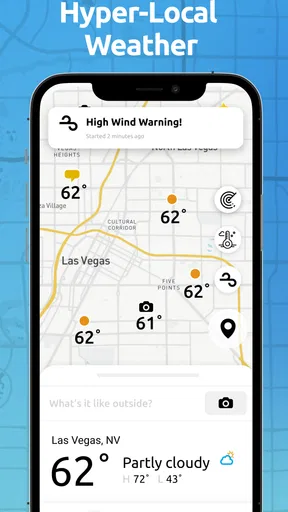
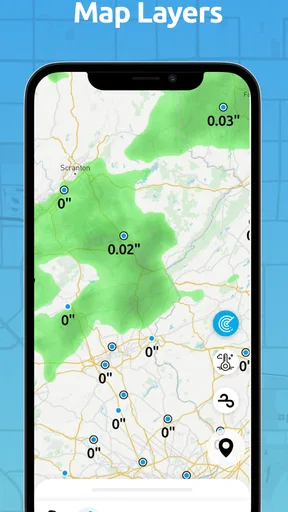
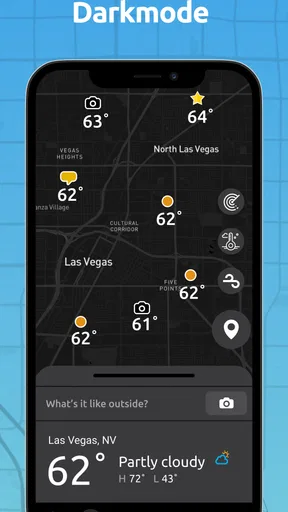
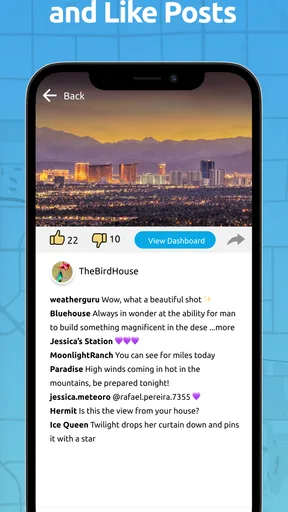
Our Review of Ambient Weather Network
 Analysis by Appyee
I like weather apps most when they help answer a very local question: is it actually raining near my route, garden, or front door? That is the idea behind Ambient Weather Network. It is a free weather app from Ambient Weather, built around a community of local weather stations rather than only a broad regional forecast. In my view, that focus is its clearest reason to try it—and also the key to understanding where it can and cannot replace a conventional forecast app.
Why neighborhood-level observations matter
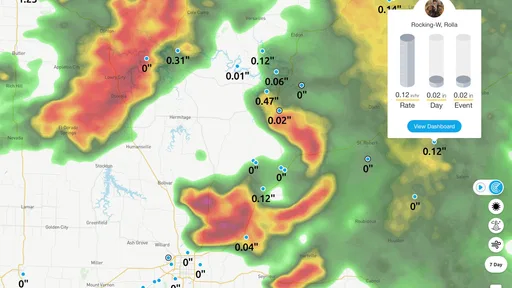
Weather can change over a short distance. A forecast for an entire city may be useful for the day ahead yet miss a shower passing over one neighborhood, or the cooler conditions near a hillside. Ambient Weather Network aims to make nearby observations easier to consult by connecting users with a network of personal weather stations. When a station is close to the place you care about, its readings can give a more immediate sense of what is happening there than a citywide summary.
That difference is practical rather than magical. A local station reports conditions at its own location; it does not guarantee that the same conditions apply everywhere around it, and an observation is not the same thing as a forecast. I would use the network to add context to a forecast, not treat one nearby reading as a promise about the next several hours. This is the most useful way to approach the app: as a window onto local conditions, especially when the broad outlook feels too general.
How I would use the local view
For a quick check, I would first look for a station that is genuinely close to the place I am planning around, then compare its conditions with the wider outlook I already use. If the readings tell a different story, I would take that as a reason to be cautious, not as proof that one source must be wrong. A station in a different part of town may be experiencing a different pocket of weather, which is exactly why location matters.
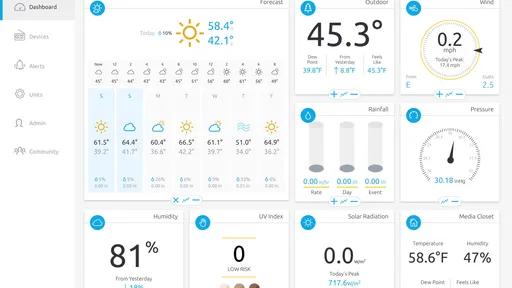
The app lets you customize the dashboard with measurements such as temperature, humidity, and wind speed. That gives the screen a more useful role than simply showing a number: you can prioritize what affects your plans. For a walk, temperature and wind may be the first things I want to see; when deciding whether to leave outdoor items exposed, I would pay closer attention to changing conditions. The practical tip is to keep the dashboard focused on the measures you actually use, rather than turning every glance into a hunt through information.
Historical data can add another layer. I find it most useful for looking back at a pattern rather than trying to make a precise prediction from past readings. Someone tending a garden, comparing conditions around a home, or keeping informal notes about a local microclimate may get more from that history than someone who only wants to know whether to carry an umbrella today. It can help you notice recurring differences, but it still needs to be read as context, not a substitute for a forecast.
A realistic day with the app
Imagine I am deciding whether to take a longer walk after work. A general forecast gives me the broad expectation, but the local station view can help me check what is happening near the route before I head out. I would look at the current readings, consider whether the nearby station is close enough to be relevant, and use any available alerts as another prompt to reassess. If conditions look unsettled, I can choose a shorter route or bring a layer rather than relying on a forecast that may not reflect my immediate area.
That is where the network can earn its place on my phone: it gives me another piece of evidence at the moment I need to make a small decision. It cannot remove uncertainty, and I would not rely on a single station for decisions where severe weather safety is involved. But for everyday choices—when to water, whether to air out a room, or whether to move a plan indoors—a local observation can be more revealing than a generic icon for the whole city.
Getting to Know the Ambient Weather Network
First off, let's dive into what makes this app tick. The Ambient Weather Network is not your average weather app. It’s a comprehensive platform that taps into a vast network of personal weather stations. This means you’re getting hyper-localized weather data, which is a significant step up from the generic forecasts that are often way off the mark.
Setting up the app is a breeze. As soon as you fire it up, you’re greeted with a clean and intuitive interface. The design is sleek and modern, which makes navigation a walk in the park. You can easily switch between different views, whether you want a quick glance at the current conditions or a more detailed analysis of what’s coming up.
Features That Stand Out
One of the standout features of the Ambient Weather Network is its ability to provide real-time updates. Because it draws data from a network of personal weather stations, you’re always in the loop with the most accurate information available. I found this especially useful when planning outdoor activities. No more getting caught in the rain because of outdated forecasts!
The app also offers a variety of customization options. You can tailor the dashboard to display the metrics that matter most to you, such as temperature, humidity, wind speed, and more. This level of personalization ensures you’re getting the info you need at a glance.
What nearby readings can—and cannot—tell you
In practice, I would treat a personal station as a useful local witness, not an all-purpose authority. Its readings can help answer what the air feels like at that spot right now, while a forecast is better suited to the question of what might happen later. Keeping those roles separate is a small habit that makes the information more useful: check observations for immediate decisions, then use a forecast for timing and broader planning.
There is also a useful way to handle conflicting readings. If a station shows warmer or windier conditions than the general forecast suggests, I would check whether it is actually near my destination before changing plans. A station across town may reflect a different local pocket; one close to home may be a better guide for the next errand. Comparing locations can be more informative than searching for a single number that supposedly represents the whole area.
That makes the app especially interesting for people who already notice small weather differences around their homes or commutes. It may help you compare what happens near a shaded garden, an exposed street, or a more open part of town, provided the available stations are relevant to those places. The value comes from observing patterns over time, not from assuming that every station represents an entire neighborhood.
Deep Dive into the Data
For those who love to geek out on data, the Ambient Weather Network doesn’t disappoint. There’s a treasure trove of historical data available, which is fantastic for identifying trends and patterns over time. Whether you’re a data analyst or just curious about how the weather impacts your local environment, this feature is pure gold.
Another excellent aspect is the alert system. You can set up notifications for specific weather events, such as severe storms or temperature changes. This proactive approach means you’re never caught off guard by sudden weather shifts. It’s like having a personal meteorologist on call 24/7.
Alerts are a prompt, not a safety plan
I would use alerts as a nudge to check conditions, rather than handing them responsibility for a safety decision. A notification can bring a change to my attention while I am busy, but I would still look at the situation and consult appropriate local guidance when the weather could put people or property at risk. This is a sensible trade-off for any alert-based weather tool: convenience is valuable, but it does not remove the need for judgment.
For everyday use, it helps to choose notifications that connect to a real decision. If temperature changes affect a household routine or outdoor plans, an alert can be worth having. If every possible event is switched on, notifications may become background noise and lose the ability to catch your attention. I would start with the changes that would genuinely alter what I do, then adjust only if I find I need more.
The historical view and alerts serve different purposes, so I would not expect one to replace the other. Looking back helps me understand patterns; an alert helps me react to a change. Together, they make more sense when I already know which local conditions matter to my plans, rather than simply collecting readings because they are available.
Where it fits beside other weather apps
Compared with the usual weather app built around a city forecast, Ambient Weather Network has a more observational feel. A conventional forecast app is often the faster choice when I only need a broad outlook for tomorrow or want a familiar summary before traveling. This one makes more sense when I want to inspect conditions reported by local stations and learn how they differ across places I care about.
I would not make it my only weather source if my main need were a simple, dependable forecast for a trip several days away. Its strongest angle is local station data, so a person who never checks neighborhood conditions may get less from it than from an app focused on forecast summaries. On the other hand, if a citywide prediction often feels too blunt for your immediate surroundings, the station network adds a worthwhile second perspective.
It is also worth being realistic about the community element. A network of personal stations is most useful when there are relevant stations near the places you want to monitor. Before building a routine around a particular area, I would check whether the available local view is useful for that location. If not, the app’s central advantage may matter less to you, and a standard forecast app could be the more practical everyday choice.
Community and Connectivity
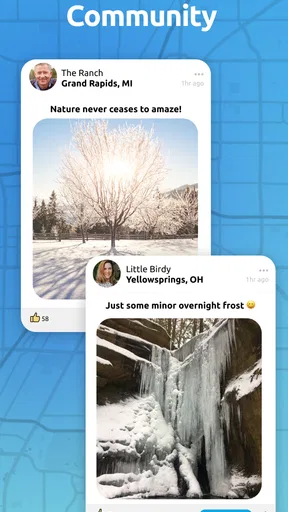
One of the more unique aspects of the Ambient Weather Network is its community-driven approach. Users can connect with others who have their own weather stations, sharing data and insights. This creates a sense of community and collaboration that you don’t usually find in typical weather apps. It’s a fantastic way to engage with like-minded individuals and learn more about your local climate.
The app also integrates seamlessly with smart home devices, which is a huge plus. You can connect it with smart thermostats and other IoT devices, making your home even more responsive to weather changes. It's a nifty feature that brings the future of home automation to your fingertips.
Who is likely to get the most from it?
I think the clearest fit is someone who wants weather information tied to a particular home, garden, commute, or outdoor routine and enjoys checking more than a single forecast summary. Gardeners may appreciate looking back at local conditions while deciding whether their own observations fit a broader pattern. People planning walks, yard work, or a short outing can use nearby readings as a last-minute check, especially when conditions vary across town.
It can also suit weather enthusiasts who like comparing stations and following the character of their local area. The app’s historical information gives that curiosity somewhere to go beyond the immediate forecast, while its community focus makes local measurements more interesting than isolated numbers. If you would rather see a concise forecast and close the app, though, the extra local perspective may feel like more detail than you need.
The practical question I would ask before relying on it is simple: are there stations near the places I care about, and do I want to check local observations often enough to benefit? If the answer to either is no, a conventional forecast app is likely the easier fit. If both answers are yes, the network can add context without forcing you to give up the broader forecast tools you already use.
Who should skip it, and what to expect
I would skip Ambient Weather Network if I only want a quick, uncomplicated answer about the general forecast and have no interest in local station observations, historical patterns, or the community side. It is also not the right tool to treat as a guaranteed warning system or as proof that conditions are identical across a neighborhood. Its value depends on using its local perspective thoughtfully.
The app is free, rated for Everyone, and has an average rating of 4.8 from around 3,500 ratings, with over 100,000 installs. It was released on August 15, 2018, and version 4.6.3 requires Android 7.0 or later. In-app purchases range from $4.99 to $99.99 per item, so I would check the purchase details in the app before committing to anything; the basic download itself costs nothing.
For me, the best reason to keep it alongside a general forecast is that it encourages a more careful question: what is happening near the place I am actually going? When a relevant station is available, that can make small daily decisions feel less like guesswork. When I need a broad outlook or a simple forecast first, I would reach for the tool designed for that job and use local readings as supporting context.
Final Thoughts
So, is the Ambient Weather Network worth a download? Absolutely. Whether you’re a weather aficionado or just someone who likes to stay informed, this app has something for everyone. Its blend of real-time updates, customization options, and community features make it a standout in the crowded world of weather apps.
In a nutshell, the Ambient Weather Network offers a refreshing take on weather forecasting by leveraging the power of personal weather stations. It's accurate, user-friendly, and incredibly insightful. So, why not give it a try and see how it changes your approach to weather awareness? You just might find yourself becoming a bit of a weather buff in the process!
Verdict
Strengths of Ambient Weather Network
- Real-time weather updates are highly accurate.
- User-friendly interface with easy navigation.
- Customizable alerts for severe weather conditions.
- Integrates seamlessly with smart home systems.
- Wide range of weather data and analytics available.
Limitations of Ambient Weather Network
- Limited free features; subscription required for more.
- Occasional app crashes reported by some users.
- Requires stable internet for continuous updates.
- Some advanced features can be overwhelming.
- Notifications can be overly frequent and intrusive.
Similar Picks in This Category
View All
Weather - By Xiaomi
Xiaomi Inc.4.1

Weather & Radar Forecast
WetterOnline4.8

Weather
OneLouder Apps4.6

AccuWeather: Weather Radar
AccuWeather3.6

The Weather Channel - Radar
The Weather Channel4.6

1Weather Forecasts & Radar
OneLouder Apps4.3
Frequently Asked Questions
What features does the Ambient Weather Network app offer?
The Ambient Weather Network app provides real-time weather updates, customizable weather alerts, and detailed forecasts. Users can view interactive weather maps, track weather patterns, and access hyper-local weather conditions. Additionally, it integrates with personal weather stations for personalized data, making it a comprehensive tool for weather enthusiasts.
Is the Ambient Weather Network app free to use?
Yes, the Ambient Weather Network app is free to download and use. However, it may offer in-app purchases or subscriptions to unlock premium features, such as advanced forecasting tools or ad-free experiences. Users should check the app store for any specific pricing details related to these premium options.
How accurate is the weather data provided by the app?
The app is designed to deliver highly accurate weather information by aggregating data from multiple sources, including government agencies and personal weather stations. Its real-time updates and hyper-local forecasts help ensure users receive precise and timely weather details tailored to their specific location.
Does the Ambient Weather Network app work with personal weather stations?
Yes, the app is compatible with various personal weather stations, allowing users to integrate their own devices into the network. This feature enables users to access and analyze their personalized weather data alongside broader regional forecasts, enhancing the app’s utility for those with home weather equipment.
What devices and operating systems support the Ambient Weather Network app?
The Ambient Weather Network app is available for both Android and iOS devices. It is designed to work on smartphones and tablets running the latest versions of these operating systems. Users should ensure their devices are updated to the most recent OS version for optimal performance and compatibility.
